Unity InvalidCastException Explained: Causes, Fixes, and Best Practices

Unity ArgumentNullException Explained: Causes, Fixes, and Best Practices
February 7, 2026
Unity Performance Bottlenecks Explained: How to Identify and Fix Them
February 8, 2026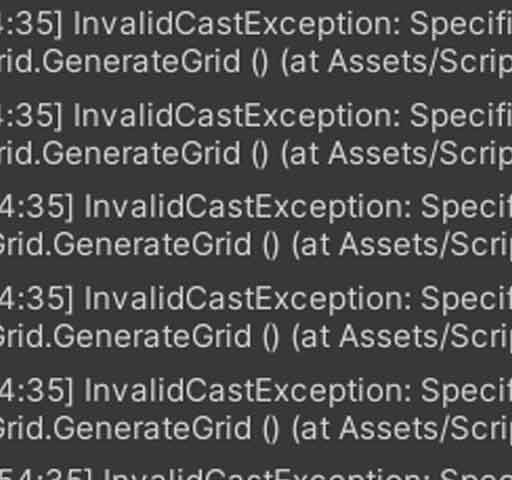
One common error Unity developers encounter is:
InvalidCastException: Specified cast is not valid
This exception occurs when you try to convert or cast an object to a type that it cannot be converted to. Unlike NullReferenceException or ArgumentNullException, which deal with missing or null objects, InvalidCastException happens when the object exists but is of the wrong type. Understanding why this happens and how to prevent it is crucial for building stable Unity projects.
What Is an InvalidCastException in Unity?
An InvalidCastException occurs in Unity when you attempt to cast an object to a type that it does not inherit from or implement. For example, casting a GameObject to a Rigidbody directly will throw this exception.
Example console output:
InvalidCastException: Specified cast is not valid
    at PlayerController.Start() ...
This tells you that the exception happened at a specific line in your code where a cast was invalid.
Common Causes of InvalidCastException
1. Using GetComponent Incorrectly
Attempting to cast the result of GetComponent to the wrong type:
GameObject player = GameObject.Find("Player");
Rigidbody rb = (Rigidbody)player.GetComponent(typeof(BoxCollider)); // InvalidCastException
Here, you are trying to cast a BoxCollider component to a Rigidbody, which is invalid.
2. Incorrect Casting Between Script Types
Attempting to cast one script type to another unrelated script:
EnemyController enemy = (EnemyController)other.GetComponent(); // InvalidCastException
This happens when the actual component is not compatible with the type you are casting to.
3. Casting Objects from Collections
If you store objects in generic collections and cast them incorrectly:
ArrayList list = new ArrayList();
list.Add(new PlayerController());
EnemyController enemy = (EnemyController)list[0]; // InvalidCastException
4. Casting ScriptableObjects or Assets
Trying to cast a ScriptableObject or prefab asset to the wrong type:
ScriptableObject asset = Resources.Load("PlayerData");
EnemyData data = (EnemyData)asset; // InvalidCastException
5. Using UnityEvents or Delegates Incorrectly
If a delegate expects a specific type but receives another, casting may fail:
public delegate void OnHit(PlayerController player);
OnHit hitEvent = (OnHit)otherEvent; // InvalidCastException
How to Fix InvalidCastException
1. Use the Correct Type with GetComponent
Use generic GetComponent() for type safety:
Rigidbody rb = player.GetComponent<Rigidbody>(); // Safe
This avoids casting mistakes entirely.
2. Check Type Before Casting
Use is or as keywords to safely verify type:
Component comp = player.GetComponent(typeof(Component));
if(comp is Rigidbody rb) {
    rb.mass = 10;
}
Or using as:
Rigidbody rb = comp as Rigidbody;
if(rb != null) {
    rb.mass = 10;
}
3. Avoid Casting Between Unrelated Scripts
Ensure that you only cast components to compatible types or interfaces. If the script types are unrelated, do not attempt a cast.
4. Handle Collections Carefully
When retrieving objects from non-generic collections like ArrayList, verify their type before casting:
if(list[0] is EnemyController enemy) {
    enemy.TakeDamage(10);
}
5. Validate Resources and Assets
When loading assets from Resources or ScriptableObjects, ensure the type matches:
PlayerData data = Resources.Load<PlayerData>("PlayerData"); // Safe
Debugging Techniques
Read the Stack Trace
The Unity Console shows the exact line where the invalid cast happened. This is your starting point for fixing the issue.
Use Debug.Log for Type Checking
Debug.Log("Type of object: " + comp.GetType());
This helps identify the actual type before casting.
Use Breakpoints in IDE
Inspect the object in your debugger to verify its type before performing a cast. This is especially helpful when working with dynamically loaded assets or event callbacks.
Best Practices to Prevent InvalidCastException
- Use generic
GetComponent<T>()instead of casting. - Check object type using
isorasbefore casting. - Avoid casting between unrelated scripts or components.
- Validate collection items before casting.
- Use type-safe asset loading with generics.
- Test code with different objects to catch casting errors early.
Conclusion
InvalidCastException occurs when you attempt to convert an object to a type that is incompatible with its actual type. This exception is common in Unity when using GetComponent, loading assets, working with collections, or handling events. Using generic methods, safe type checking, and proper initialization can prevent these errors.
By following best practices for type safety and careful casting, you can avoid InvalidCastException, making your Unity projects more stable, efficient, and easier to debug.