
Unity Inspector Reference Reset Bug: Why Public Variables Lose Assignments and How to Prevent It

Unity UI Canvas Dirty Flag Bug: Performance Issues and Rendering Artifacts
February 13, 2026
Unity Skybox Seams Bug: Visible Edges in Skybox Textures
February 14, 2026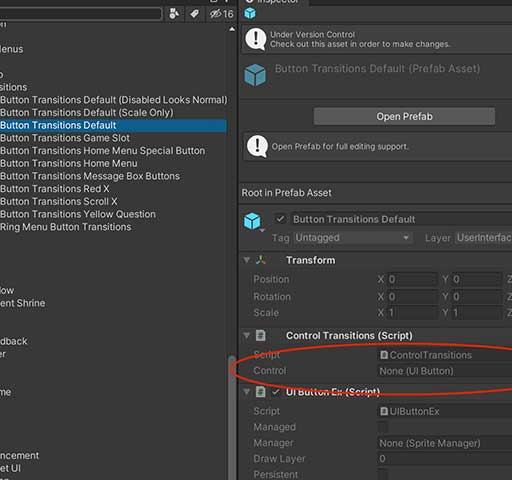
Few things are more frustrating in Unity than opening your scene and discovering that your carefully assigned Inspector references are suddenly missing.
Your public variables were set. Everything worked yesterday. Today, they are None (Missing).
This issue is often described as a “Unity Inspector reference reset bug.” In reality, Unity is usually behaving correctly, but certain actions cause serialized references to break or reset.
This article explains why public variables lose their assignments and how to prevent it reliably.
How Unity Stores Inspector References
When you assign a reference in the Inspector, Unity serializes that reference inside the scene file or prefab file. It stores a link to the object using internal IDs.
If something changes that breaks that link, Unity clears the reference.
This means the problem is almost always related to:
- Script changes
- Prefab structure changes
- Object deletion
- Assembly reload
- Serialization mismatches
Common Cause 1: Renaming or Changing the Script Class
If you rename the script file or the class inside it without doing it properly, Unity may lose the connection between the script and the serialized data.
For example:
public class PlayerManager : MonoBehaviour
{
    public GameObject weapon;
}
If you rename the class to:
public class PlayerController : MonoBehaviour
{
public GameObject weapon;
}
Unity may treat it as a completely new component, and your references disappear.
Safe way to rename scripts:
- Rename both the file and class name together
- Let Unity recompile fully
- Avoid renaming during Play Mode
Common Cause 2: Changing Variable Type
If you change the type of a serialized field, Unity cannot convert the old stored reference.
Example:
Before:
public GameObject target;
After:
public Transform target;
Even though it looks compatible, Unity sees this as a different type and resets the assignment.
If you must change types, expect references to clear.
Common Cause 3: Removing or Renaming Serialized Fields
If you delete or rename a public or [SerializeField] variable, Unity removes the stored reference.
Safer alternative:
Instead of renaming:
public GameObject enemy;
Use:
[SerializeField] private GameObject enemy;
This lets you refactor access level without breaking serialization.
Common Cause 4: Prefab Overrides Breaking
Sometimes references disappear only inside prefabs. This usually happens when:
- The referenced object is inside the prefab and gets deleted
- The prefab structure changes
- Nested prefab relationships break
Unity clears the reference because the target object no longer exists.
Common Cause 5: Script Compilation Errors
If Unity fails to compile scripts, serialized data can behave unpredictably until compilation succeeds.
Always fix all compile errors before checking Inspector assignments.
Common Cause 6: Domain Reload and Assembly Reload
When Unity reloads assemblies (after script changes), it re-serializes objects. If something in the type definition changed, references may reset.
This is common when:
- Changing namespaces
- Moving scripts between assemblies
- Editing assembly definition files
Common Cause 7: Using Non-Serializable Types
Unity only serializes supported types. If you use unsupported types, assignments will not persist.
Incorrect:
public Dictionary<string, GameObject> map;
Dictionaries are not serialized by default. Unity will not save this properly.
How to Prevent Inspector Reference Loss
1. Avoid Renaming Fields After Assignment
If you must rename a field, consider keeping the original name and refactoring later.
2. Use [SerializeField] Instead of Public Fields
This protects against accidental external modifications while preserving serialization.
[SerializeField] private GameObject player;
3. Avoid Changing Field Types Frequently
Type changes almost always reset references.
4. Keep Scripts Stable Before Large Scene Setup
Do not heavily modify scripts after assigning dozens of references in the scene.
5. Use Prefab Validation Scripts
You can add simple validation checks:
void OnValidate()
{
    if (target == null)
    {
        Debug.LogWarning("Target reference missing", this);
    }
}
This helps detect missing references immediately.
6. Use Version Control
Sometimes references disappear due to merge conflicts in scene or prefab files. Using version control helps restore lost assignments.
When It Is Actually a Unity Bug
Rarely, references may reset due to corrupted meta files or scene files. If that happens:
- Reimport the asset
- Delete the Library folder (with Unity closed)
- Let Unity rebuild
Most of the time, however, the issue comes from serialization rules being misunderstood.
Conclusion
Unity Inspector reference resets are usually not random bugs. They are caused by script renaming, type changes, prefab restructuring, or serialization limits.
Understanding how Unity serializes data is the key to preventing this issue. Once you respect serialization rules and avoid breaking changes after assignment, your references will remain stable.
Stable scripts lead to stable Inspector assignments. And stable assignments save hours of frustration.





