
Unity MissingReferenceException Explained: Causes, Fixes, and Best Practices

Unity NullReferenceException Explained: Causes, Fixes, and Best Practices
February 7, 2026
Unity IndexOutOfRangeException Explained: Causes, Fixes, and Best Practices
February 7, 2026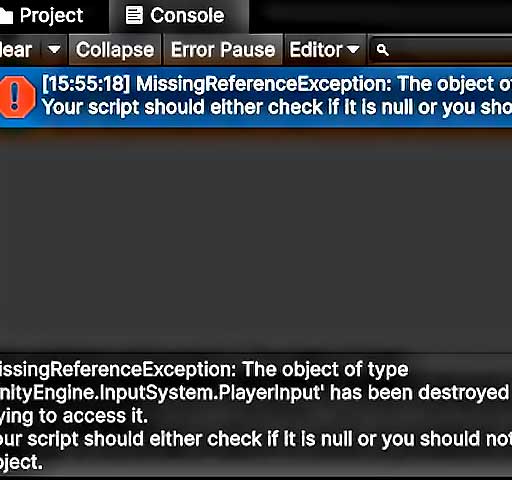
One of the most common errors Unity developers encounter during runtime is:
MissingReferenceException: The object of type 'X' has been destroyed but you are still trying to access it
This error occurs when your script attempts to access a GameObject, Component, or asset that has already been destroyed or removed from the scene. Unlike NullReferenceException, which occurs when a variable was never assigned, MissingReferenceException happens when the reference once existed but no longer does. This guide will explain why this happens, common causes, and practical ways to prevent and fix it.
What Is a MissingReferenceException in Unity?
A MissingReferenceException in Unity happens when a script tries to use a reference to an object that has been destroyed during runtime. Unity internally sets destroyed objects to a special null state. Accessing any properties or methods of such objects will trigger this error.
Example console output:
MissingReferenceException: The object of type 'Enemy' has been destroyed but you are still trying to access it
    at EnemyController.Update() ...
Here, the script attempted to access an enemy object that was destroyed earlier in the scene. The console provides the exact location in the script where the exception occurred, making it easier to debug.
Common Causes of MissingReferenceException
This exception is usually tied to object lifecycle management in Unity. The most frequent causes include:
1. Accessing Destroyed GameObjects
If you destroy a GameObject using Destroy(gameObject) and then later attempt to access it, Unity will throw MissingReferenceException:
Destroy(enemy);
enemy.health = 100; // This will throw MissingReferenceException
2. Accessing Destroyed Components
Destroying a component attached to a GameObject also invalidates any references to it. For example:
Destroy(enemy.GetComponent<Renderer>());
enemy.GetComponent<Renderer>().material.color = Color.red; // Throws exception
3. Cached References to Destroyed Objects
Sometimes you store a reference to an object in a variable or collection. If that object is destroyed elsewhere, your cached reference becomes invalid:
List<GameObject> enemies = new List<GameObject>();
enemies.Add(enemy);
Destroy(enemy);
enemies[0].SetActive(true); // Throws MissingReferenceException
4. Coroutine Accessing Destroyed Objects
If a coroutine continues running after the object it references is destroyed, any access in the coroutine will trigger this exception:
IEnumerator AttackEnemy() {
    while(enemy != null) {
        enemy.TakeDamage(10); // Will fail if enemy is destroyed mid-loop
        yield return new WaitForSeconds(1f);
    }
}
5. Event Callbacks on Destroyed Objects
If you have event subscriptions that reference destroyed objects, invoking the event can throw MissingReferenceException:
enemy.OnDeath += HandleEnemyDeath;
Destroy(enemy);
enemy.OnDeath.Invoke(); // Throws exception because 'enemy' was destroyed
How to Fix MissingReferenceException
Fixing this error involves checking object lifecycle and adding safeguards. The following strategies work well:
1. Null Checks Before Accessing Objects
Unity treats destroyed objects as “fake null.” You can safely check if an object is null before using it:
if (enemy != null) {
    enemy.TakeDamage(10);
}
This prevents exceptions and allows your script to handle destroyed objects gracefully.
2. Remove or Nullify References on Destroy
When destroying an object, it’s good practice to remove any cached references or unsubscribe from events:
enemy.OnDeath -= HandleEnemyDeath;
enemy = null;
Destroy(enemy);
This prevents lingering references that could trigger exceptions.
3. Use Try/Catch in Edge Cases
For coroutines or functions that may occasionally access destroyed objects, wrap the code in a try/catch block:
try {
    enemy.TakeDamage(10);
} catch(MissingReferenceException e) {
    Debug.Log("Enemy was destroyed before damage could be applied");
}
4. Check Lists and Collections Before Access
If you store references in arrays or lists, make sure to remove destroyed objects or filter nulls before use:
enemies.RemoveAll(item => item == null);
foreach(var enemy in enemies) {
    enemy.SetActive(true);
}
5. Coroutine Safety
When using coroutines, add null checks inside the loop:
IEnumerator AttackEnemy() {
    while(enemy != null) {
        enemy.TakeDamage(10);
        yield return new WaitForSeconds(1f);
    }
}
This ensures that the coroutine exits gracefully if the object is destroyed mid-loop.
Debugging Techniques
Read the Stack Trace
The Unity Console shows exactly which line and script caused the exception. Double-clicking the error will take you to that line in your code.
Use Debug.Log to Inspect References
Logging object states can help identify when an object becomes invalid:
Debug.Log(enemy);
Debug.Log(enemy == null);
Use the IDE Debugger
Set breakpoints on lines that access objects and inspect whether they are destroyed. This is especially helpful for coroutines or event callbacks.
Best Practices to Prevent MissingReferenceException
- Manage object lifecycles carefully. Always know when an object will be destroyed.
- Use null checks before accessing any object reference.
- Remove destroyed objects from collections and unsubscribe from events.
- Prefer centralized object managers to track active objects and handle cleanup.
- Be cautious with coroutines and delayed method calls that reference objects that may be destroyed.
Conclusion
MissingReferenceException occurs when a script attempts to access an object that has been destroyed. This error is common in runtime gameplay when objects are dynamically created and destroyed. Understanding why this exception occurs and implementing safeguards such as null checks, proper cleanup of references, and careful coroutine management will make your Unity projects more stable and reliable.
By following best practices for object lifecycle management, event subscription, and collection handling, you can prevent MissingReferenceException from disrupting your game logic and ensure smooth, crash-free gameplay experiences.





