Unity IndexOutOfRangeException Explained: Causes, Fixes, and Best Practices
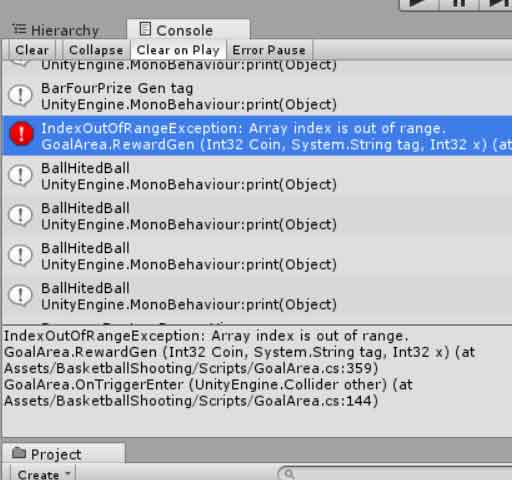
If you have worked with Unity and C#, you may have encountered this error:
IndexOutOfRangeException: Index was outside the bounds of the array
This exception occurs when your code tries to access an element in an array, list, or collection using an index that does not exist. It is a common error among beginners and experienced developers alike. In this guide, we will explain why this error happens, provide examples, and offer practical ways to fix and prevent it.
What Is an IndexOutOfRangeException in Unity?
An IndexOutOfRangeException happens when your code tries to access an element at a position that does not exist in the array or list. Arrays and lists in C# are zero-based, meaning the first element is at index 0 and the last element is at Length - 1. Accessing an index outside this range triggers the exception.
Example console output:
IndexOutOfRangeException: Index was outside the bounds of the array
    at Inventory.Update() ...
Here, the script attempted to access an element in an array using an invalid index, causing the exception.
Common Causes of IndexOutOfRangeException
1. Looping Beyond Array or List Length
The most common cause is looping past the length of a collection:
int[] numbers = new int[5];
for (int i = 0; i < 6; i++) {  // i = 5 is invalid
    Debug.Log(numbers[i]);
}
The loop tries to access index 5, which does not exist (valid indices are 0–4).
2. Empty or Null Arrays/Lists
If an array or list is empty, any access attempt will throw an exception:
int[] numbers = new int[0];
Debug.Log(numbers[0]); // Throws IndexOutOfRangeException
3. Incorrect Use of Random Index
Using Random.Range incorrectly can cause out-of-bounds errors:
int[] enemies = new int[3];
int randomIndex = Random.Range(0, 4); // Max is exclusive for arrays
Debug.Log(enemies[randomIndex]); // Can throw exception
4. Removing Elements from a List During Iteration
Removing items inside a loop without adjusting the index can skip elements or go out of bounds:
for (int i = 0; i < enemies.Count; i++) {
    enemies.RemoveAt(i);
    Debug.Log(enemies[i]); // Can throw IndexOutOfRangeException
}
5. Using the Wrong Array Size
If you assume an array has a certain length but it was declared differently or resized, accessing an invalid index will trigger the error:
int[] scores = new int[10];
Debug.Log(scores[15]); // Index 15 does not exist
How to Fix IndexOutOfRangeException
1. Check Array and List Bounds
Always ensure that indices are within the valid range:
if (i >= 0 && i < numbers.Length) {
    Debug.Log(numbers[i]);
}
For lists:
if (i >= 0 && i < enemies.Count) {
    Debug.Log(enemies[i]);
}
2. Use Length or Count Properly
Use array Length and list Count to limit loops:
for (int i = 0; i < numbers.Length; i++) {
    Debug.Log(numbers[i]);
}
3. Adjust Loops When Removing Items
If you remove items from a list, loop backwards:
for (int i = enemies.Count - 1; i >= 0; i--) {
    enemies.RemoveAt(i);
}
4. Use Random Safely
When using Random.Range with arrays or lists, remember that the upper bound is exclusive:
int randomIndex = Random.Range(0, enemies.Count); // Correct
Debug.Log(enemies[randomIndex]);
5. Initialize Arrays and Lists Correctly
Make sure arrays or lists are properly initialized before accessing:
int[] scores = new int[10]; // Correct
List<int> scoresList = new List<int>() {0,1,2}; // Correct
Debugging Techniques
Read the Console Carefully
The Unity Console provides the exact line and method where the exception occurs. Start debugging there.
Best Practices to Prevent IndexOutOfRangeException
Always validate indices before accessing arrays or lists.
Use loops that respect Length and Count.
Be careful when removing items from collections while iterating.
Initialize arrays and lists with correct sizes.
Use defensive programming to catch unexpected errors.
Conclusion
IndexOutOfRangeException is one of the most common Unity errors when working with arrays and lists. It occurs when your code tries to access a position outside the bounds of the collection. Understanding the causes, such as invalid loops, incorrect random indices, or collection modifications during iteration, will help you prevent and fix this error.
Using proper bounds checks, careful iteration, and safe initialization practices will ensure your Unity projects are stable and free from these runtime exceptions, making your development process smoother and more efficient.