Unity Physics Layers Best Practices: Organize Collisions Efficiently

Why Objects Pass Through Walls (Tunneling)
February 22, 2026
Unity Timeline Not Playing: Causes and How to Fix It
February 22, 2026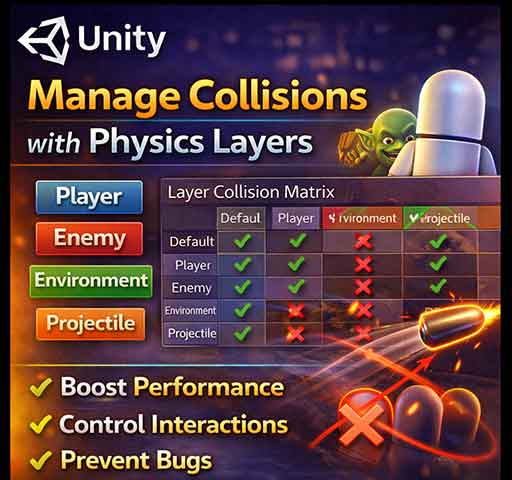
Unity’s physics system is powerful, but without proper organization, collisions can become messy, performance-heavy, and unpredictable. Physics layers are a key tool for managing which objects can interact with each other.
Understanding and using layers correctly can improve performance and prevent unexpected collisions in your game.
What Are Physics Layers?
Physics layers are a way to categorize GameObjects. Each Rigidbody or Collider can be assigned to a layer. Unity can then selectively enable or disable collisions between layers.
This is controlled through the Layer Collision Matrix in Edit → Project Settings → Physics.
Why Use Physics Layers?
- Improve performance by ignoring unnecessary collisions
- Prevent unintended interactions (e.g., bullets hitting the player that fired them)
- Organize game objects logically (e.g., enemies, environment, pickups)
- Support special mechanics (e.g., ghost objects, no-collision zones)
Best Practices for Unity Physics Layers
1. Keep Layers Specific
Use separate layers for different categories:
- Player
- Enemy
- Environment
- Projectiles
- Triggers
Avoid using the default layer for everything; it makes collision management confusing.
2. Configure Layer Collision Matrix
Decide which layers should collide:
- Player ↔ Environment: yes
- Player ↔ Player: maybe no
- Projectiles ↔ Player: depends on friendly fire
- Enemies ↔ Enemies: usually no
Disable unnecessary collisions in the matrix to improve performance.
3. Use Layer Masks for Raycasting
When performing raycasts, always use layer masks to ignore irrelevant layers:
LayerMask obstacleMask = LayerMask.GetMask("Environment", "Enemy");

if (Physics.Raycast(transform.position, transform.forward, out RaycastHit hit, 100f, obstacleMask))
{
    Debug.Log("Hit: " + hit.collider.name);
}
This ensures the ray only considers relevant objects, improving both accuracy and performance.
4. Assign Layers via Script When Needed
You can dynamically assign layers at runtime:
gameObject.layer = LayerMask.NameToLayer("Projectile");
Useful for bullets or temporary objects that need special collision rules.
5. Avoid Too Many Layers
Unity allows up to 32 layers, but using all of them is usually unnecessary. Keep layers meaningful and organized.
6. Combine Layers With Tags
Use layers for collision and tags for identification. For example, a GameObject could be on the “Enemy” layer and tagged “Boss”.
7. Test Collision Logic Thoroughly
Even small mistakes in the Layer Collision Matrix can cause objects to pass through each other or collide unexpectedly. Always test gameplay scenarios thoroughly.
Example: Ignoring Player Projectiles on Player Layer
void Start()
{
    // Ignore collisions between Player and its projectiles
    int playerLayer = LayerMask.NameToLayer("Player");
    int projectileLayer = LayerMask.NameToLayer("PlayerProjectile");

    Physics.IgnoreLayerCollision(playerLayer, projectileLayer, true);
}
This prevents bullets from hitting the player who fired them, without affecting collisions with enemies.
Performance Considerations
- Each unnecessary collision check adds CPU cost
- Disabling irrelevant layer interactions improves performance, especially for many objects
- Use continuous collision detection only for important fast objects
Common Mistakes
- Leaving everything on Default layer
- Not configuring the collision matrix → unwanted interactions
- Misusing tags instead of layers for physics decisions
- Overusing layers for non-physics purposes
Quick Checklist
- Do you have meaningful layers for all collision categories?
- Is the Layer Collision Matrix configured to ignore unnecessary interactions?
- Are raycasts using layer masks?
- Are dynamic objects assigned the correct layers at runtime?
- Have you tested collisions in all gameplay scenarios?
Final Thoughts
Physics layers in Unity are simple but extremely powerful. Proper use of layers reduces unnecessary collisions, improves performance, and prevents frustrating gameplay bugs like bullets hitting unintended targets or players sticking to walls.
By combining thoughtful layer organization, layer collision matrix configuration, and layer-aware scripting, you can build a reliable and efficient physics system for any type of game.