Unity Kinematic Rigidbody Explained: What It Really Does and When to Use It

Unity Rigidbody vs CharacterController: Complete Comparison and When to Use Each
February 21, 2026
Unity Rigidbody Interpolation Explained: Smooth Movement Without Jitter
February 22, 2026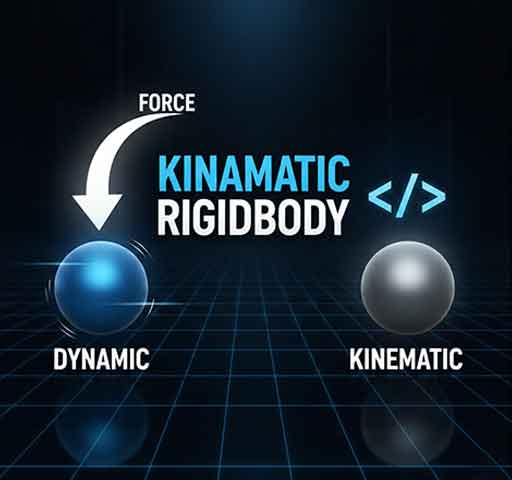
The term “Kinematic Rigidbody” confuses a lot of Unity developers. You check the Is Kinematic box on a Rigidbody and suddenly physics behaves differently. Objects stop reacting to forces. Collisions feel different. Some callbacks stop firing.
So what is actually happening?
Let’s break it down clearly and practically.
What Is a Kinematic Rigidbody?
A Rigidbody with Is Kinematic enabled is controlled by your code, not by the physics engine.
This means:
- It ignores forces
- It ignores gravity
- It does not react to collisions physically
- But it still affects other dynamic rigidbodies
Think of it as a physics object that you move manually.
Normal Rigidbody vs Kinematic Rigidbody
Normal (Dynamic) Rigidbody
- Responds to gravity
- Responds to AddForce()
- Can be pushed
- Physics engine controls motion
Kinematic Rigidbody
- Ignores gravity
- Ignores AddForce()
- Cannot be pushed by physics
- You move it manually via code
How to Enable Kinematic Mode
In the Inspector:
- Select your Rigidbody
- Check Is Kinematic
Or via code:
Rigidbody rb = GetComponent<Rigidbody>();
rb.isKinematic = true;
How to Move a Kinematic Rigidbody Properly
Since physics no longer moves it, you must control it manually.
Recommended Method: MovePosition
void FixedUpdate()
{
    Vector3 targetPosition = transform.position + transform.forward * 5f * Time.fixedDeltaTime;
    rb.MovePosition(targetPosition);
}
MovePosition keeps collision detection stable.
Avoid Direct Transform Movement
This is not recommended:
transform.position += transform.forward * 5f * Time.deltaTime;
Direct transform changes can cause tunneling or missed collisions.
Collision Behavior with Kinematic Rigidbody
Here is something important:
- Kinematic vs Dynamic → Collisions work
- Kinematic vs Kinematic → No collision response
- Kinematic vs Static Collider → No physical reaction
Kinematic bodies can push dynamic rigidbodies, but they themselves will not be affected.
Common Use Cases
1. Moving Platforms
You want a platform to move along a path but not fall due to gravity.
2. Doors
A door that opens smoothly via animation but should still push the player.
3. Cutscene Objects
Objects that move predictably without physics interference.
4. AI Characters with Custom Movement
If you are fully controlling movement logic manually.
Switching Between Kinematic and Dynamic
You can switch modes at runtime.
Example: Ragdoll activation.
void EnableRagdoll()
{
    rb.isKinematic = false;
}
When disabled, physics takes control again.
Correct version using your required format:
void EnableRagdoll()
{
rb.isKinematic = false;
}
Common Mistakes
1. Expecting AddForce to Work
If isKinematic is true, this will do nothing:
rb.AddForce(Vector3.up * 10f);
Kinematic bodies ignore forces completely.
2. Using Update Instead of FixedUpdate
Physics movement should happen inside FixedUpdate for consistent results.
3. Forgetting Collision Detection Mode
If objects move fast, enable Continuous collision detection to prevent passing through other colliders.
Kinematic Rigidbody vs CharacterController
Both give manual movement control, but they are not identical.
- CharacterController has built-in slope handling
- Kinematic Rigidbody uses physics collision system
- CharacterController does not use real physics
If you need physics interaction, Kinematic Rigidbody is often the better choice.
Performance Considerations
Kinematic bodies are lighter than dynamic bodies because they are not fully simulated by physics forces.
However, excessive manual movement or complex collision checks can still impact performance.
When NOT to Use Kinematic Rigidbody
- If you need realistic physics reactions
- If the object must be affected by explosions or forces
- If gravity-driven motion is required
In those cases, use a dynamic Rigidbody.
Quick Summary
- Kinematic = controlled by code
- Dynamic = controlled by physics
- Kinematic can push dynamic objects
- Kinematic ignores forces and gravity
Final Thoughts
Kinematic Rigidbody is not “better” or “worse” than dynamic Rigidbody. It is simply a different mode.
If you want precise control without physics interference but still need collision detection, Kinematic is often the perfect middle ground.
Once you understand that it disables force-based simulation but keeps collision logic, its behavior becomes completely predictable.
Related Posts: