Unity Tilting Character on Z Axis Bug: Why Your Player Starts Leaning or Falling Sideways

One Scene, Many Levels: How to Build Multiple Levels Inside a Single Unity Scene
February 21, 2026
Unity Player Sticking to Walls Issue: Causes and Reliable Fixes
February 21, 2026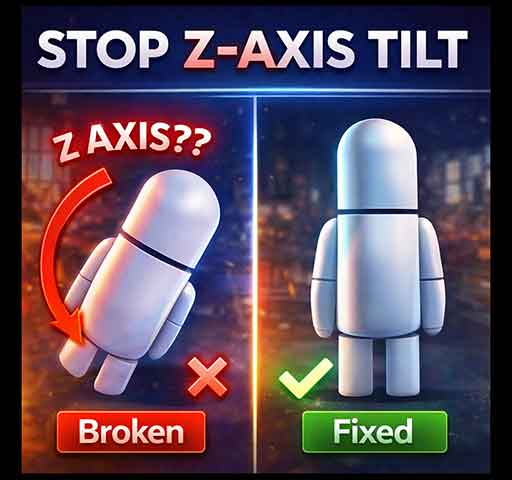
You press Play. Your character moves forward correctly. Then suddenly it starts tilting on the Z axis. Maybe it slowly leans to one side. Maybe it fully tips over. Maybe it rotates slightly every time it collides with something.
This is a very common issue in 3D games, especially when using Rigidbody or CharacterController.
The good news is that this problem is almost always caused by physics settings or rotation control logic, not a mysterious Unity bug.
What the Problem Looks Like
- Character slowly rotates on the Z axis while walking
- Character tips over after hitting walls
- Character leans sideways when moving on slopes
- Rotation changes slightly every frame
In most character-based games, you want rotation only on the Y axis (turning left and right), not on X or Z.
Cause 1: Rigidbody Physics Forces
If your character uses a Rigidbody and it is not constrained, physics collisions can apply torque. That torque rotates the object on any axis.
Even small collision forces can cause visible tilt.
Fix: Freeze Rotation on X and Z
Select your Rigidbody component and enable:
- Freeze Rotation X
- Freeze Rotation Z
Or do it via code:
void Start()
{
    Rigidbody rb = GetComponent<Rigidbody>();
    rb.constraints = RigidbodyConstraints.FreezeRotationX
                   | RigidbodyConstraints.FreezeRotationZ;
}
This prevents physics from tilting the character.
Cause 2: Applying Force Incorrectly
If you use AddForce in world space without care, the character may accumulate unwanted rotational effects.
Example risky movement:
rb.AddForce(transform.forward * speed);
If collisions occur at angles, rotation may build up.
Safer Movement Pattern
Instead of relying purely on forces, consider controlling velocity directly:
Vector3 velocity = new Vector3(moveX, rb.velocity.y, moveZ);
rb.velocity = velocity;
This gives you more control and reduces random tilt.
Cause 3: CharacterController on Slopes
If you are using CharacterController, tilt can occur if you rotate the entire player object based on movement direction.
For example:
transform.rotation = Quaternion.LookRotation(moveDirection);
If moveDirection contains vertical components (from slopes), the character may rotate slightly on X or Z.
Fix: Remove Vertical Component
moveDirection.y = 0f;
transform.rotation = Quaternion.LookRotation(moveDirection);
This ensures rotation only happens on the Y axis.
Cause 4: Model Pivot or Import Settings
Sometimes the issue is not physics at all.
Your 3D model may have:
- Incorrect pivot alignment
- Rotation baked into the mesh
- Non-zero rotation on import
Check the model in the Inspector. Reset its rotation to (0, 0, 0). If needed, fix orientation in your 3D software before exporting.
Cause 5: Animation Root Motion
If you are using root motion, animations themselves can contain slight rotation data.
This can slowly tilt the character over time.
Fix Options
- Disable Apply Root Motion in Animator
- Ensure animations do not contain unwanted rotation
- Use “Bake Into Pose” settings in animation import
Defensive Rotation Lock (Extra Safety)
If you want to force rotation stability every frame:
void LateUpdate()
{
    Vector3 rotation = transform.eulerAngles;
    transform.eulerAngles = new Vector3(0f, rotation.y, 0f);
}
This ensures the character can only rotate on Y.
Use this carefully, as it overrides physics rotation completely.
When Using a Capsule Collider
Capsule colliders are stable for characters because they resist tipping. If you are using a BoxCollider, switching to CapsuleCollider can reduce unwanted rotation.
Quick Debug Checklist
- Are Rigidbody X and Z rotations frozen?
- Are you using AddForce instead of controlled velocity?
- Does moveDirection contain vertical values?
- Does the model have proper pivot alignment?
- Is root motion applying unwanted rotation?
Is This a Unity Bug?
Almost never. This behavior is expected when physics torque or rotation logic is not restricted.
Unity allows full 3D physics simulation by default. If you want character-style movement, you must restrict unwanted axes.
Final Thoughts
Character tilting on the Z axis usually comes from uncontrolled physics rotation or incorrect rotation calculations.
The simplest and most reliable solution is freezing X and Z rotation in the Rigidbody. After that, verify movement direction calculations and model alignment.
Once rotation is properly constrained, the tilting problem disappears completely.