
Unity Composite Collider Bug: Holes in Generated Geometry (Causes and Fixes)

Unity Sprite Atlas Padding Bug: Visible Gaps Between Sprites
February 15, 2026
Unity Build Size Bug: Unexpectedly Large Executables (Causes and Real Fixes)
February 16, 2026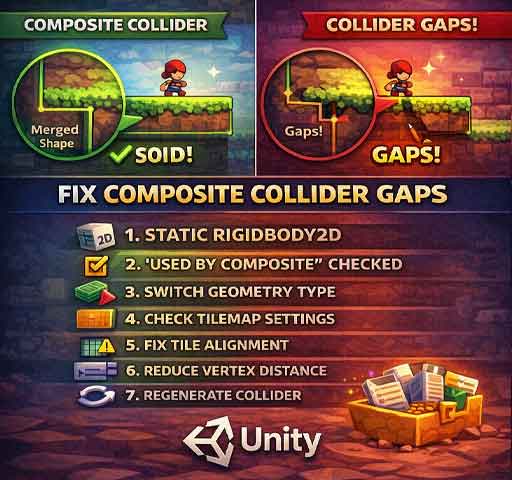
You enable a Composite Collider on your Tilemap or 2D object, expecting a clean, merged collision shape. Instead, you notice gaps in the collider. Characters fall through certain spots. Small holes appear where solid tiles should be.
This is often described as a “Composite Collider bug.” In most cases, Unity is working correctly. The issue usually comes from collider configuration, geometry type settings, or tile alignment problems.
Here is how to diagnose and fix it step by step.
How Composite Collider 2D Works
The Composite Collider 2D merges multiple Collider 2D shapes into one optimized outline.
It requires:
- A Rigidbody2D (usually set to Static)
- Collider2D components with “Used By Composite” enabled
- A CompositeCollider2D component
If any of these are misconfigured, geometry may not combine properly.
Step 1: Confirm Rigidbody2D Is Present
The Composite Collider requires a Rigidbody2D on the same GameObject.
Without it, the collider may not generate correctly.
Best practice:
- Set Rigidbody2D Body Type to Static
Step 2: Enable “Used By Composite” on Child Colliders
Select your TilemapCollider2D or other Collider2D components and verify:
- Used By Composite is checked
If this option is disabled, the Composite Collider will ignore those shapes.
Step 3: Check Geometry Type (Outlines vs Polygons)
Composite Collider has two geometry types:
- Outlines
- Polygons
If you see unexpected holes, switch between them and test.
Outlines generate edge-based shapes. Polygons generate filled shapes. For solid terrain, Polygons is often more reliable.
Step 4: Check Tilemap Collider Settings
If using TilemapCollider2D, verify:
- Tilemap Collider Type is correct (Grid or Sprite)
- Tiles actually have collider shapes assigned
If a tile has no collider defined in the Sprite Editor, the Composite Collider cannot include it.
Step 5: Look for Tiny Gaps Between Tiles
If tile positions are slightly misaligned, small gaps can appear in the generated collider.
Check:
- Grid Cell Size consistency
- No scaling on Tilemap GameObject
- No fractional tile positioning
Tilemaps should usually remain at scale (1,1,1).
Step 6: Adjust Vertex Distance
The Composite Collider has a setting called:
- Vertex Distance
If this value is too high, Unity may simplify shapes too aggressively and remove small sections.
Try lowering Vertex Distance (for example, from 0.1 to 0.01) and regenerate.
Step 7: Watch for One-Way Platforms
If using Platform Effector 2D or one-way colliders, parts of the composite may intentionally not behave as solid.
Make sure effectors are configured correctly and not interfering with expected collision behavior.
Step 8: Regenerate the Collider
Sometimes the collider does not refresh immediately.
Try:
- Disabling and re-enabling the TilemapCollider2D
- Toggling Used By Composite off and on
- Re-entering Play Mode
This forces Unity to rebuild the geometry.
Common Scenario: Small Holes Only at Corners
This usually happens because:
- Tile sprites have irregular collider shapes
- Sprite outlines are not perfectly square
Open the Sprite Editor and inspect the custom physics shape for each tile.
For grid-based games, use simple box shapes instead of detailed outlines.
Quick Debug Checklist
- Rigidbody2D present and set to Static
- Used By Composite enabled
- Geometry Type set correctly
- Tiles have proper collider shapes
- Tilemap scale is 1,1,1
- Vertex Distance reduced
Is This a Unity Bug?
True engine bugs in Composite Collider are rare in current Unity versions. Most holes in generated geometry come from misconfiguration or overly simplified shapes.
Composite Collider works best with clean, grid-aligned, consistent tiles.
Final Thoughts
If you see holes in your Composite Collider geometry, focus on configuration before assuming an engine issue.
Proper Rigidbody setup, correct geometry type, and clean tile collider shapes solve almost all cases.
Once configured correctly, Composite Collider creates efficient and reliable 2D collision surfaces.





