Burst Compiler Overview in Unity

Procedural Audio Basics in Unity
February 25, 2026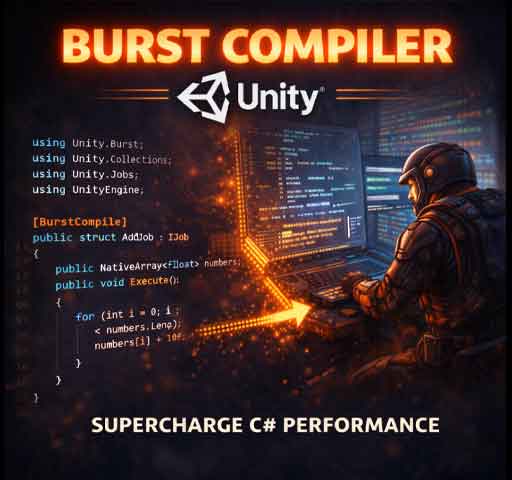
If you’ve ever written clean C# code in Unity and thought, “I wish this ran as fast as C++,” the Burst Compiler is Unity’s answer to that problem.
Burst is a high-performance compiler that translates a subset of C# into highly optimized native machine code. It’s designed to work with Unity’s Job System and the Data-Oriented Technology Stack (DOTS), and when used correctly, it can dramatically improve performance.
In this guide, we’ll break down what Burst is, how it works, when to use it, and how to start using it in your own projects.
What Is the Burst Compiler?
The Burst Compiler is a package that compiles C# jobs into optimized native code using LLVM.
Instead of running through the normal managed runtime pipeline, Burst converts your job code into highly efficient instructions tailored to the target platform.
This results in:
- Better CPU performance
- Automatic vectorization (SIMD)
- Reduced overhead
- Optimized math operations
In short, your code runs closer to hardware speed.
Why Burst Exists
Traditional Unity scripts run on the managed C# runtime. That’s flexible and easy to use, but it comes with overhead.
For gameplay logic, that’s usually fine.
For heavy computations like:
- Physics calculations
- Procedural generation
- Large-scale AI
- Pathfinding
- Massive entity simulations
You need something faster.
Burst bridges the gap between C# convenience and native-level performance.
How Burst Works
Burst works together with:
- Unity Job System
- Native containers (NativeArray, NativeList, etc.)
When you mark a job with the [BurstCompile] attribute, Unity compiles it using Burst instead of the normal runtime.
This compilation happens ahead-of-time or just-in-time depending on platform and settings.
Installing Burst
- Open Package Manager
- Search for “Burst”
- Install the Burst package
It usually installs automatically with DOTS-related packages.
Basic Burst Example
Here’s a simple job that adds values in a NativeArray:
using Unity.Burst;
using Unity.Collections;
using Unity.Jobs;
using UnityEngine;

[BurstCompile]
public struct AddJob : IJob
{
    public NativeArray<float> numbers;

    public void Execute()
    {
        for (int i = 0; i < numbers.Length; i++)
        {
            numbers[i] += 10f;
        }
    }
}

public class BurstExample : MonoBehaviour
{
    void Start()
    {
        NativeArray<float> data = new NativeArray<float>(1000, Allocator.TempJob);

        AddJob job = new AddJob
        {
            numbers = data
        };

        JobHandle handle = job.Schedule();
        handle.Complete();

        data.Dispose();
    }
}
The key part is the [BurstCompile] attribute. That tells Unity to compile this job with Burst.
Performance Benefits
When using Burst properly, you can see:
- 2x to 10x speed improvements
- Efficient SIMD usage
- Better memory alignment
The actual gains depend on workload type. Math-heavy tasks benefit the most.
SIMD and Vectorization
One of Burst’s biggest advantages is automatic SIMD optimization.
SIMD stands for Single Instruction, Multiple Data. It allows the CPU to process multiple data points in a single instruction.
For example, adding four floats at once instead of one at a time.
You don’t need to manually write SIMD code. Burst does it automatically when your code is structured properly.
Restrictions and Rules
Burst doesn’t support all C# features.
You cannot use:
- Managed objects
- Classes inside jobs (use structs)
- Garbage-collected memory
- Most UnityEngine APIs
You should use:
- Structs
- NativeArray
- Unity.Mathematics library
- Blittable data types
Think data-oriented, not object-oriented.
Using Unity.Mathematics
Burst works best with the Unity.Mathematics library.
Example:
using Unity.Mathematics;

float3 position = new float3(1f, 2f, 3f);
float3 velocity = new float3(0.5f, 0f, 0f);

position += velocity * 5f;
These types are optimized for Burst and SIMD operations.
Burst Inspector
Unity provides a Burst Inspector tool.
It allows you to:
- View generated assembly code
- See optimization details
- Debug Burst compilation issues
This is useful when optimizing performance-critical systems.
When to Use Burst
Use Burst when:
- You’re processing large datasets
- You’re running heavy math loops
- You’re using the Job System
- CPU performance is a bottleneck
Do not use Burst for:
- Simple gameplay scripts
- UI logic
- Small per-frame tasks
It shines in high-scale systems.
Common Mistakes
- Forgetting to mark the job with [BurstCompile]
- Using managed arrays instead of NativeArray
- Accessing UnityEngine objects inside jobs
- Not disposing Native containers properly
Always profile before and after adding Burst.
Performance Mindset
Burst works best when you structure data in contiguous memory blocks and avoid unnecessary branching.
Data-oriented thinking matters more than clever code.
Simple loops over large arrays often outperform complex object hierarchies.
Final Thoughts
The Burst Compiler is one of the most powerful performance tools in modern Unity development.
It allows you to stay in C#, but get close to native-level performance.
Start small. Move heavy math into jobs. Add the [BurstCompile] attribute. Measure the difference.
Once you see the speed gains, you’ll start designing systems differently. More data-driven. More parallel. More efficient.
And that’s where Unity performance really starts to scale.