If you’ve ever built enemy AI that suddenly starts behaving strangely, switching actions randomly or getting stuck between behaviors, you’ve probably needed a clearer structure.
That structure is often a Finite State Machine, or FSM.
Finite State Machines are one of the most practical and reliable ways to build game AI. They’re simple, predictable, and easy to debug. More importantly, they scale well from small indie projects to larger games.
In this guide, we’ll break down what an FSM is, why it works so well for AI, and how to build one in Unity using clean, reusable C# code.
What Is a Finite State Machine?
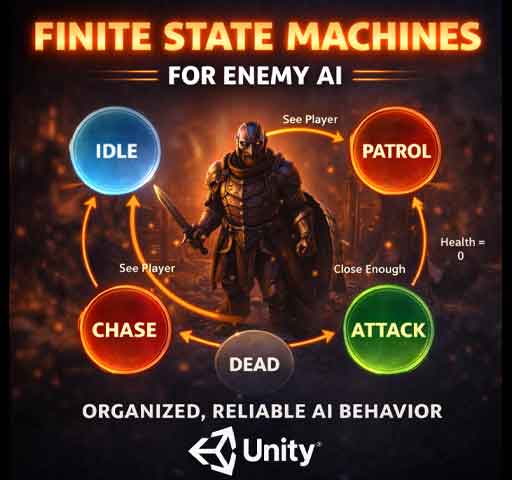
A Finite State Machine is a system where an object can only be in one state at a time, and it switches between states based on conditions.
Think of a basic enemy:
Idle
Patrol
Chase
Attack
Dead
At any moment, the enemy is in exactly one of these states. It doesn’t patrol and attack at the same time. It transitions when certain rules are met.
For example:
If the player is detected → switch from Patrol to Chase
If close enough → switch from Chase to Attack
If health reaches zero → switch to Dead
That’s an FSM.
Why FSMs Work So Well for AI
Finite State Machines are powerful because they:
Keep logic organized
Prevent conflicting behaviors
Are easy to debug
Are predictable
When something goes wrong, you just check which state the AI is in. That alone saves hours of debugging.
Basic FSM Structure
A clean FSM usually has three parts:
A State interface or base class
Concrete state classes (Idle, Chase, etc.)
A State Machine controller
Let’s build a simple example.
Step 1: Create a Base State
public abstract class AIState
{
    protected EnemyAI enemy;

    public AIState(EnemyAI enemy)
    {
        this.enemy = enemy;
    }

    public abstract void Enter();
    public abstract void Update();
    public abstract void Exit();
}
This ensures every state has three core methods:
Enter() – runs when the state starts
Update() – runs every frame
Exit() – runs when leaving the state
Step 2: Create Concrete States
Idle State
public class IdleState : AIState
{
    public IdleState(EnemyAI enemy) : base(enemy) { }

    public override void Enter()
    {
        Debug.Log("Entering Idle");
    }

    public override void Update()
    {
        if (enemy.CanSeePlayer())
        {
            enemy.ChangeState(new ChaseState(enemy));
        }
    }

    public override void Exit()
    {
        Debug.Log("Exiting Idle");
    }
}
Chase State
public class ChaseState : AIState
{
    public ChaseState(EnemyAI enemy) : base(enemy) { }

    public override void Enter()
    {
        Debug.Log("Starting Chase");
    }

    public override void Update()
    {
        enemy.MoveTowardsPlayer();

        if (!enemy.CanSeePlayer())
        {
            enemy.ChangeState(new IdleState(enemy));
        }
    }

    public override void Exit()
    {
        Debug.Log("Stopping Chase");
    }
}
Step 3: Create the State Machine Controller
using UnityEngine;

public class EnemyAI : MonoBehaviour
{
    private AIState currentState;

    void Start()
    {
        currentState = new IdleState(this);
        currentState.Enter();
    }

    void Update()
    {
        currentState.Update();
    }

    public void ChangeState(AIState newState)
    {
        currentState.Exit();
        currentState = newState;
        currentState.Enter();
    }

    public bool CanSeePlayer()
    {
        // Placeholder logic
        return Vector3.Distance(transform.position, Vector3.zero) < 5f;
    }

    public void MoveTowardsPlayer()
    {
        transform.position = Vector3.MoveTowards(
            transform.position,
            Vector3.zero,
            Time.deltaTime * 3f
        );
    }
}
Now the AI behaves clearly and predictably. Each behavior lives in its own class.
Improving FSM Design
The example above creates new state objects during transitions. That works, but you can improve it by:
Caching states instead of recreating them
Using enums for quick debugging
Separating decision logic from action logic
For larger systems, you may also introduce:
State transition rules
Hierarchical state machines
ScriptableObject-based states
Common AI States in Games
Here are typical states you’ll see in enemy AI:
Idle
Patrol
Alert
Chase
Attack
Flee
Stunned
Dead
You don’t need all of them. Start simple. Add complexity only when needed.
Handling Transitions Cleanly
One common mistake is putting too many transition checks everywhere.
Keep transitions:
Clear
Intentional
Centralized inside Update()
Avoid letting multiple states fight over control.
When FSMs Are Enough (And When They Aren’t)
FSMs are perfect for:
Enemies with clear behavior patterns
Bosses with defined phases
NPC interaction systems
They may become difficult to manage when:
Behavior becomes extremely complex
Transitions grow unpredictable
States multiply excessively
In those cases, developers sometimes switch to behavior trees or utility AI. But for most games, FSMs are more than enough.
Debugging FSMs
FSMs are easy to debug if you log state changes:
Print state name on Enter()
Show current state in Inspector
Use Gizmos to visualize detection ranges
When AI misbehaves, ask: “What state is it in right now?” That usually leads you straight to the issue.
Performance Considerations
FSMs are lightweight. Each frame, you’re just calling one Update() method.
Performance problems usually come from:
Expensive physics checks
Too many raycasts
Unnecessary object allocations
The state machine itself is rarely the bottleneck.
Final Thoughts
Finite State Machines are simple, but that’s their strength.
They force structure. They prevent chaos. They make AI behavior readable and maintainable.
If you’re building enemy AI in Unity and things are starting to feel messy, step back and define clear states.
Idle. Patrol. Chase. Attack.
Give each one its own logic. Control transitions carefully. Keep it clean.
Most great AI systems don’t start complex. They start organized. And FSMs are one of the best ways to stay organized from the beginning.